

WordPress 7.0 was billed as the “AI release”. Then it arrived, and most people opened their dashboard and found… a new colour scheme. No writing assistant. No chatbot. Nothing that looked like the AI everyone had been talking about.
That’s not because the AI part was cut. It’s because WordPress did something quieter and, for agencies, far more important: it built the plumbing. The pipes that every AI feature from now on will run through, in every plugin your clients install.
This guide explains, in plain English, what landed in WordPress 7.0 and 7.1, what got pulled at the last minute, the one security detail you should not skip, and what to switch on, test or leave alone on client sites. Every fact links to the official WordPress source.
The short version
- WordPress 7.0 shipped on 20 May 2026 with an AI Client, a Connectors screen and a bigger Abilities API. None of them generate content on their own.
- WordPress does not include any AI model. You connect a provider with your own API key, on your own account.
- Real-time collaboration was pulled twelve days before launch and is not planned for 7.2 either.
- API keys saved in the dashboard are stored unencrypted in the database. Agencies should know where client keys live.
- About seven in ten WordPress sites already run 7.x, so this is not a future problem. It’s on your clients’ sites now.
What actually shipped in WordPress 7.0
The official release post names three new AI pieces, plus an optional plugin. Here is what each one does, without the jargon.
1. The AI Client: one road to any AI provider
Before 7.0, every AI plugin built its own connection to OpenAI, Google or Anthropic, with its own settings page and its own copy of your API key. If a client had three AI plugins, they had three keys in three places.
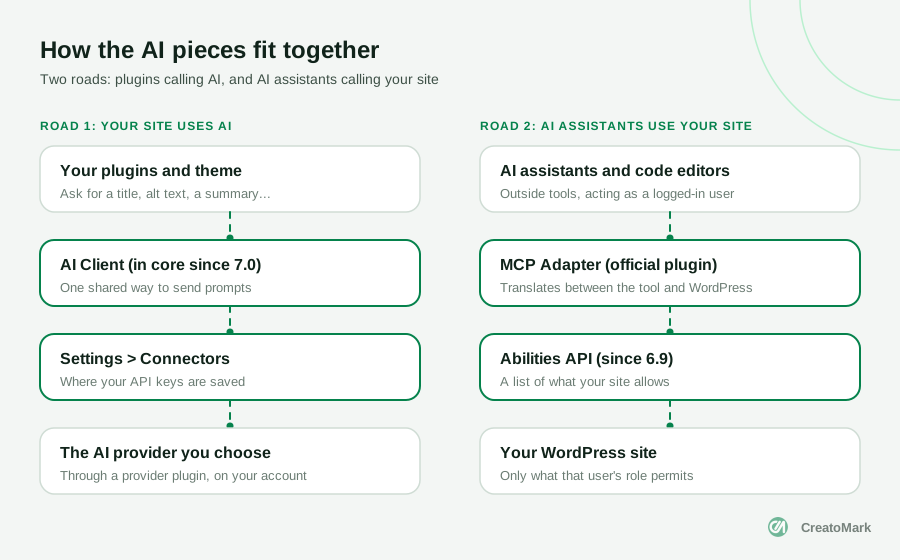
The AI Client gives all plugins one shared way to send a prompt. A plugin describes what it needs (a title, a summary, an image) and WordPress routes the request to a provider the site owner has set up. The Make WordPress Core team is clear on one point: “WordPress Core does not bundle any AI providers directly.” Providers arrive as separate plugins. Official ones exist for Anthropic, Google and OpenAI.
What this means for you: AI features in plugins will increasingly “just work” once a provider is connected. That also means usage, and the bill, run on whichever account the key belongs to. Decide early whether that’s your agency’s account or the client’s.
2. Settings > Connectors: where the keys live
The new Connectors screen under Settings is a central place to add and manage those provider connections. It ships with three featured providers (Anthropic, Google and OpenAI) and finds other providers automatically when their plugins are installed. We’ll come back to this screen, because how it stores keys matters.
3. A bigger Abilities API: what your site is allowed to do
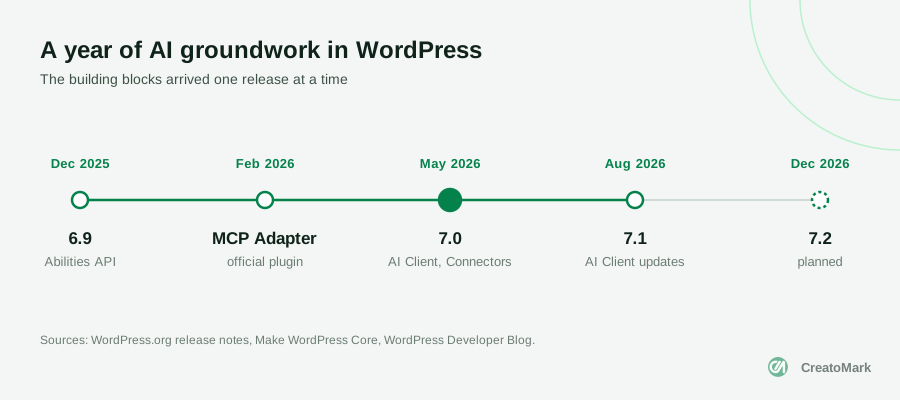
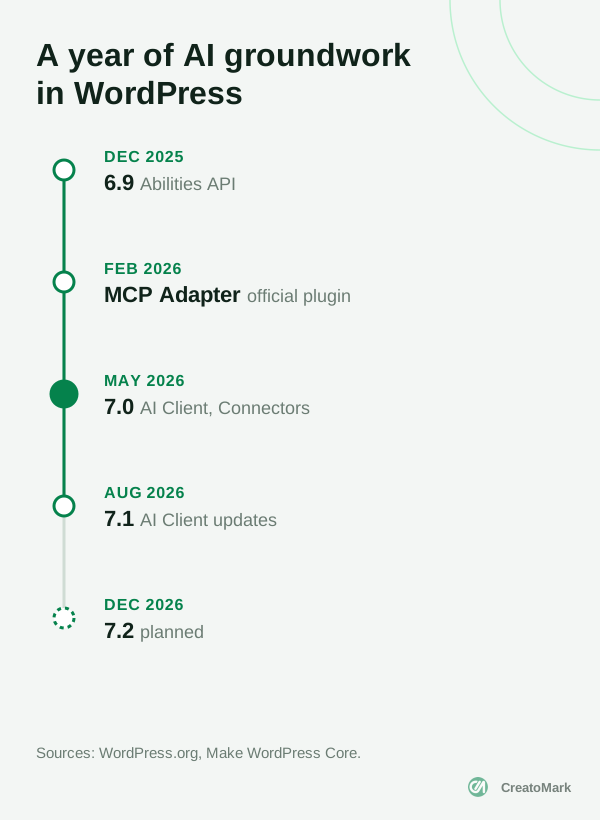
The Abilities API first arrived in WordPress 6.9 in December 2025. It’s a list of things a site can do, written in a way software can understand: “get site info”, “create a draft”, and so on, each with its own permission check.
WordPress 7.0 added a JavaScript side to it, with a built-in interface in the command palette, and connected it to the AI Client so abilities can run one after another. On its own, that sounds abstract. It becomes important the moment outside AI assistants start using it, which we cover below.
4. The official AI plugin (separate, and experimental)
The visible AI features live in a separate AI plugin published by WordPress.org. It can generate titles, excerpts, alt text, meta descriptions and summaries, generate and edit images, translate content and help moderate comments. In October 2026 it had more than 60,000 active installs.
Two things to know before you install it on a client site. It needs your own API key from a provider, and the plugin page says plainly: “This is an experimental plugin; functionality may change.” It also only works with the block editor, not the Classic Editor.
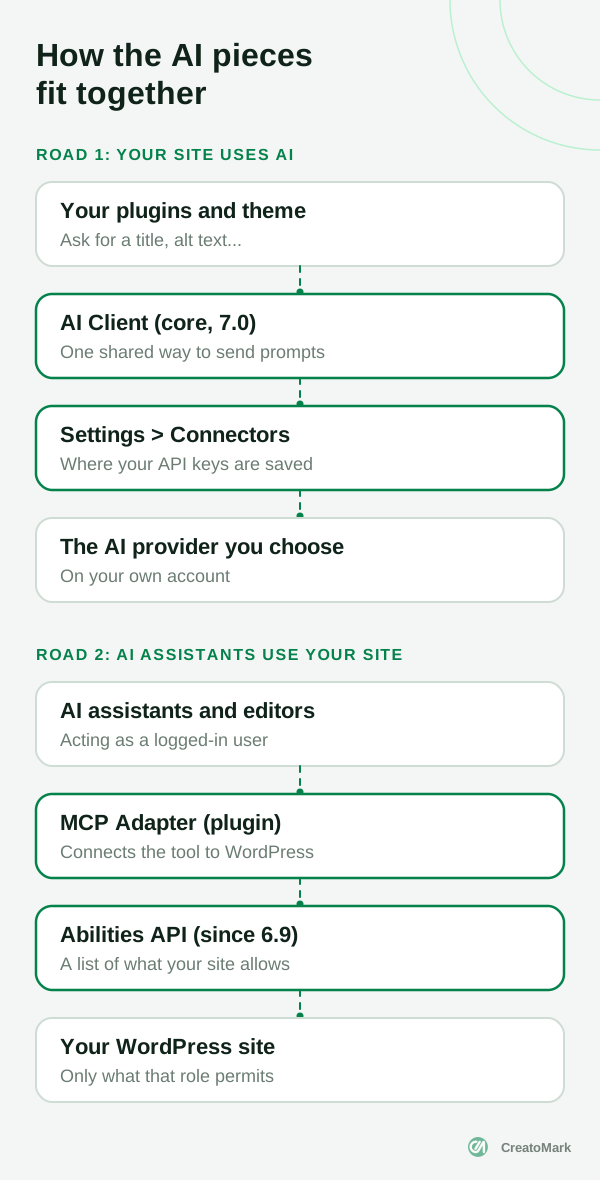
WordPress 7.0 doesn’t write anything for you. It gives every plugin one safe road to the AI provider you choose.
What got cut: real-time collaboration
For months, the headline feature of 7.0 was going to be Google Docs style editing, with several people working on the same page at once. On 8 May 2026, twelve days before launch, it was removed.
The announcement says Matt Mullenweg was “not confident the current approach is robust enough”, citing concerns around race conditions, server load, memory efficiency and recurring bugs found through testing. The feature is not dead, but don’t plan around it soon: the roadmap for 7.2 says “Collaborative editing is intentionally not on the roadmap for 7.2.”
What did ship is slower, asynchronous collaboration: notes on blocks, and in 7.1, notes with rich text and @mentions. For most agency review workflows, that covers the real need.
The part agencies should not skip: where API keys are stored
This is the detail most “what’s new” articles skip, and it’s the one that matters most if you manage client sites.
According to the Connectors API announcement, WordPress looks for a provider key in three places, in this order:
- An environment variable on the server (for example
ANTHROPIC_API_KEY) - A PHP constant in the site’s configuration
- The database, when someone pastes the key into the Connectors screen
Keys saved through the screen are masked on screen but not encrypted in the database. Encryption is still being explored. And because a key is a site setting, any plugin on the site can read it. The 7.2 roadmap puts it bluntly: “WordPress has no first-class way to store a credential.” A proposed Secrets API is meant to fix that, with a proper interface planned for later.
Our recommendation: for client sites, set provider keys as environment variables or constants rather than pasting them into the dashboard. Use one key per client, set a spending limit in the provider’s own dashboard, and remove the key when a client leaves. The official AI plugin also lists a key encryption feature, which is worth turning on if you use it.
If a client’s database is ever copied to a staging site, shared with a developer or leaked, a pasted key goes with it. A key in the server environment does not. If you run website care plans, this belongs in your setup checklist.
AI assistants can now work on WordPress sites
The second road in the diagram is newer and gets less attention. In February 2026, the WordPress Developer Blog introduced the MCP Adapter, an official plugin that lets outside AI assistants and code editors use a site’s abilities. In practice, an AI tool on someone’s laptop can read from, and potentially act on, a WordPress site.
It’s not part of core. You install it as a plugin, and the AI tool connects as a real WordPress user, for example with an application password. That means it can only do what that user’s role allows. Which is exactly why the setup matters.
The developer guide recommends:
- Creating a dedicated user with limited permissions for any AI connection, never an administrator account
- Exposing only read-only abilities on sites reachable from the internet
- Giving each ability the minimum capability it needs
- Logging and monitoring what the connection does
If a client asks you to “connect the website to our AI”, this is the conversation to have first. And if your team is using AI to deliver faster, the same rules apply to your own tools.
Your clients are probably already on it
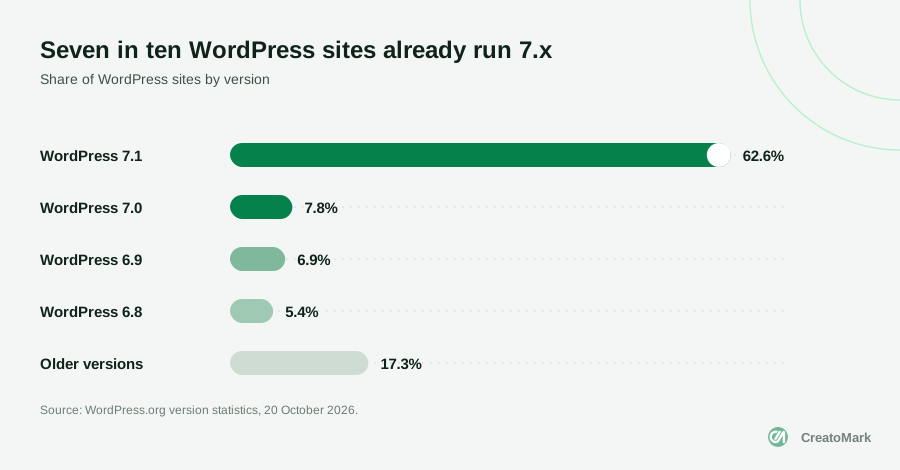
According to WordPress.org statistics on 20 October 2026, 62.6% of WordPress sites run 7.1 and 7.8% run 7.0. That’s about seven in ten sites with the AI Client and Connectors screen already in place, whether anyone has used them or not.
The rest are the ones to check. WordPress 7.0 also raised the minimum PHP version to 7.4, and the same statistics show about 5.7% of WordPress sites still run an older PHP version. Those sites can’t update to 7.x until the server does. If you have clients on old hosting, a hosting move or PHP upgrade comes first.
The rest of 7.0 and 7.1, briefly
AI took the headlines, but the 7.0 field guide lists more than 419 tickets. The changes your clients will actually notice:
- A refreshed dashboard with a new “Modern” colour scheme and a command palette (
Cmd+KorCtrl+K) - Visual revisions: scrub through versions of a page to see what changed
- Hide blocks by device, and custom CSS on individual blocks
- New blocks: Breadcrumbs, Icons and a Heading block with all levels
- A font library page for installing and managing fonts
WordPress 7.1 “Mary Lou” followed on 19 August 2026 with responsive styling in the Site Editor, a new media editor, Playlist and Tabs blocks, image processing in the browser, and native AVIF and HEIC support. The AI team’s plans for 7.1 were mostly developer plumbing, such as streaming support in the underlying library and embeddings for smarter search.

What to switch on, test or leave alone
Here’s how we’d approach it across a portfolio of client sites.
Do this month
- Update client sites to 7.1 where hosting allows, and list the ones stuck on old PHP
- Check Settings > Connectors on every site: is any key saved there, and whose account is it?
- Decide your agency’s policy: who owns AI accounts, who pays, and how keys are stored
Try on a staging site first
- The official AI plugin for alt text and excerpts, which can save editors real time
- Client plugins that now use the AI Client, to see what they send and what it costs
- The MCP Adapter, only with a dedicated low-permission user
Leave alone for now
- Pasting live client keys into the dashboard on production sites
- Write access for AI assistants on public sites
- Planning any project around real-time co-editing
What’s next: WordPress 7.2
WordPress 7.2 is set for early December 2026. The roadmap is careful with its promises. Most new AI work happens in the AI plugin first, “without a guarantee of landing in 7.2,” because “AI features must first demonstrate clear adoption and practical value before being considered for Core.”
On the list: updating the MCP Adapter to the latest specification and publishing it in the plugin directory, exploring abilities that can make changes (not just read), enabling and disabling connectors from the Connectors screen, and testing reusable site context and editorial guidance for AI features. On the security side, the proposed Secrets API and better application password controls are the pieces to watch.
In other words, WordPress is moving carefully. Good news if you look after client sites: fewer surprises, and time to set things up properly.
The bottom line
WordPress 7.0 didn’t turn WordPress into an AI website builder, and that’s the point. It made WordPress a safe, provider-neutral place for AI features to plug in, while the people who own the site stay in control of which AI, which account and which permissions.
For agencies, that’s an opportunity. Clients will ask what “AI in WordPress” means for them. The agencies with a clear answer, a key policy and a safe setup will look like the experts, because they are. If a client is thinking of replacing you with AI, this is also the best argument for why their site still needs someone who knows what they’re doing.
At CreatoMark, our own team handles WordPress development, AI setups and automations and ongoing care for agencies, delivered under your brand. Want help rolling 7.x out across your client sites? Book a call or see our plans and pricing.