


The demo went brilliantly.
Your client built a booking app with an AI tool. They clicked through it on the call: sign up, pick a time, pay, done. They’re thrilled. Now they want to launch it to their customers next week.
This is the moment to slow down, kindly. Because a demo and a product are very different things. A demo has one user, perfect data and a good internet connection. A product has hundreds of users, messy data, failed payments and someone trying to break in at 3am.
Let’s look at what usually sits under the surface of an AI-built app, how to check it, and how agencies can turn these prototypes into a valuable service.
The short version: treat an AI-built app as a working prototype. Before real customers use it, check logins, data security, secrets, payments, backups and monitoring. Then make sure someone owns it after launch day.
The iceberg problem
What the client sees in a demo is the tip. Everything that decides whether the app survives real customers is underneath.
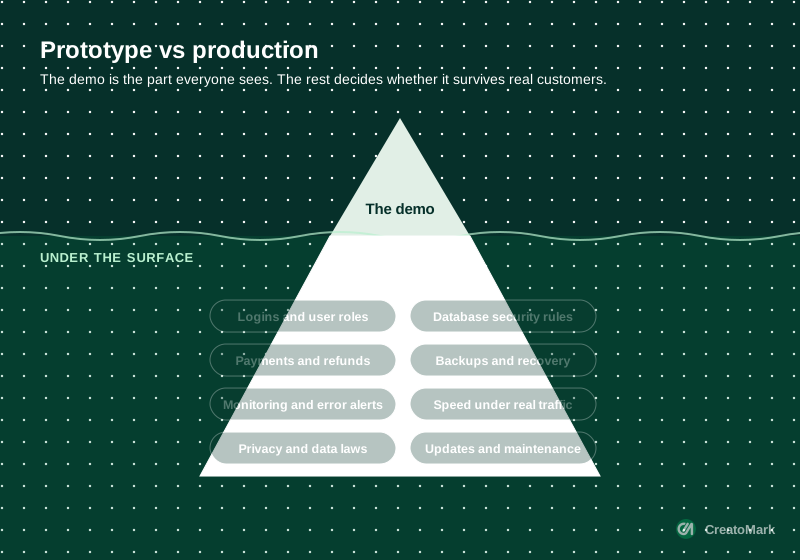
AI tools are designed to get you to a working demo fast. They’re not designed to think about what happens when a customer enters the wrong card number, a competitor scrapes your data, or your database fills up on a Saturday.
What usually breaks first
Security and data
This is the big one. Veracode’s 2025 testing found AI-generated code introduced a security flaw in 45% of tasks. Common examples map straight onto the OWASP Top 10, the standard list of the most serious web app risks: broken access control, injection and weak authentication.
Many AI app builders connect to a hosted database. If yours uses Supabase, for example, its own documentation says row level security must be enabled on every exposed table. Skip that, and data can be read by people who should never see it.
Code that’s hard to change
AI tools tend to add new code rather than reuse what’s already there. GitClear’s analysis of 211 million lines of code found duplicated code blocks rose sharply in 2024 as AI assistants spread, and copy-pasted lines overtook code that was moved and reused. Duplicated code works today and causes bugs tomorrow, when someone fixes it in one place but not the others.
Stability under change
Google’s DORA research linked more AI use with an estimated 7.2% drop in delivery stability. In plain English: when lots of code is generated quickly, releases break more often. For a business app, that means unhappy customers and lost sales.
Everything nobody asked for
Backups, error alerts, privacy policies, cookie consent, email deliverability, data exports. Nobody asks for these in a prompt, so they rarely exist, until the day they’re desperately needed.
The 10-point production checklist
Run this before any AI-built app goes in front of real customers. If an answer is “not sure”, it’s not ready yet.
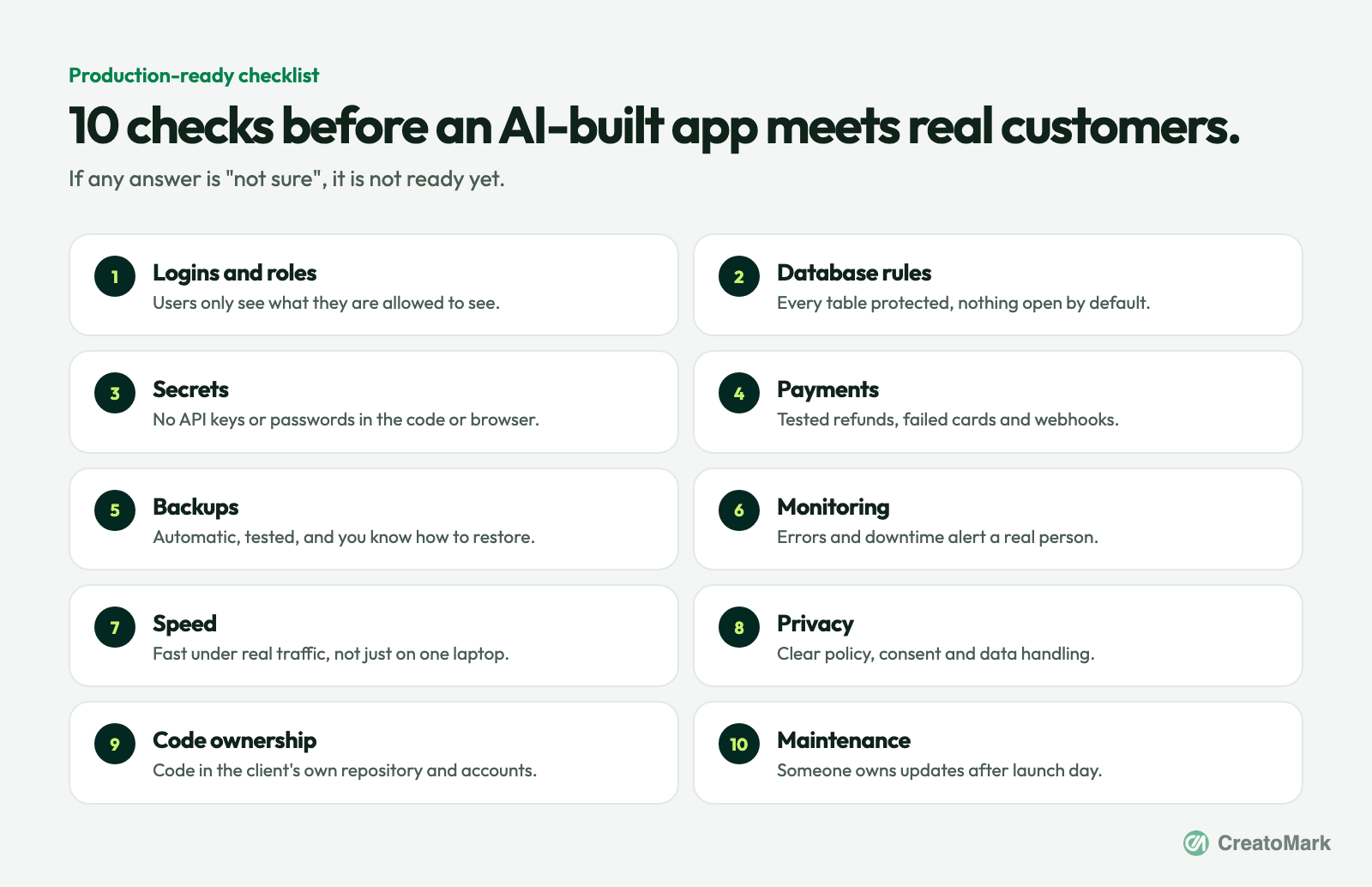
| Area | What to check | Why it matters |
|---|---|---|
| Access | Logins, roles, database rules | Users must only see their own data |
| Secrets | API keys and passwords | Exposed keys can be used to run up bills or steal data |
| Payments | Refunds, failed cards, webhooks | Money problems lose customers fastest |
| Resilience | Backups and monitoring | You find problems before customers do |
| Ownership | Code, accounts and maintenance | The client must not be locked in or left alone |
Fix, harden or rebuild?
Once the checklist is done, you’ll usually land on one of three paths:
- Harden it. The structure is sound and the issues are settings, secrets and missing safety nets. Fix them, add monitoring and backups, and launch.
- Refactor the risky parts. Most of the app is fine, but logins, payments or data access need rewriting properly.
- Rebuild on solid foundations. The app has proven the idea, but the code won’t survive growth. Keep the screens and flows the client loves, rebuild underneath.
Whichever path you take, the AI-built prototype isn’t wasted. It has done its job: proving the idea and showing exactly what the client wants. That’s worth a lot. Our vibe-coded to production service is built around exactly this step.
How to sell “production-ready” to clients
Clients don’t buy “refactoring”. They buy peace of mind. Frame it around the risks they actually care about:
- “Your customers’ data stays private.”
- “Payments work, even when something goes wrong.”
- “If it breaks at 3am, someone knows and fixes it.”
- “You own everything, and you’re never stuck.”
Then package it simply: a fixed-price production review, a hardening or rebuild project, and a monthly care and support plan so updates, monitoring and backups never stop. That last part matters most, because apps, like websites, need looking after. Our website care plans and hosting and server management cover that side.
Doing it without a big dev team
Production work needs senior developers who’ve seen things go wrong before. Few agencies want that on the payroll full-time for projects that arrive unpredictably. A white-label partner lets you offer it under your own brand, while your team stays focused on the client. If you’re new to choosing one, start with the 12 questions to ask before you hand over a client.
Has a client brought you an AI-built app that needs to go live? Book a growth call and we’ll talk through the right path, or see our plans on the pricing table.
The bottom line
AI tools have made it possible for almost anyone to build an app that works in a demo. Getting it to work for real customers, safely, every day, is still a job for people who know what can go wrong.
That’s good news for agencies. Every new AI-built prototype is a future client who needs exactly what you know how to do. Meet them before launch day, and you’ll be the partner they keep for years.