


It starts with a link and a slightly proud message: “I made this myself over the weekend. Can you just finish it off?”
And honestly? Sometimes it looks good. The client typed a few sentences into an AI builder, and out came a modern homepage with nice fonts, a hero image and a contact form. In a few hours they got further than most clients get in a month of “thinking about the website”.
Then you look underneath. And that’s where the real conversation begins.
This is happening more and more, and it’s a genuine opportunity for agencies, if you handle it well. For the bigger picture, read Clients Are Building Their Own Websites with AI. In this guide we’ll cover what usually goes wrong with AI-built sites, how to audit one in about an hour, how to decide between fixing and rebuilding, and how to price the work without making your client feel silly for trying.
The short version: treat an AI-built site like a very good first draft. Respect the client’s effort, check it properly, then either finish it or rebuild it on a foundation that will last. Never just “put it live” without a review.
Why these sites look finished but aren’t
AI builders are brilliant at the part people can see. They’re much weaker at the parts nobody sees until something breaks. And the data backs that up:
- Security. In Veracode’s 2025 study of more than 100 AI models, AI-generated code introduced a security flaw in 45% of the coding tasks they tested. Bigger, newer models didn’t do much better.
- “Almost right” code. In the 2025 Stack Overflow Developer Survey, 66% of developers said their biggest frustration with AI tools is solutions that are “almost right, but not quite”. More developers distrust the accuracy of AI tools (46%) than trust it (33%).
- Accessibility. This isn’t only an AI problem: the WebAIM Million found detectable accessibility failures on 95.9% of the top million home pages in 2026. AI builders tend to copy the same habits, like low-contrast text and missing labels.
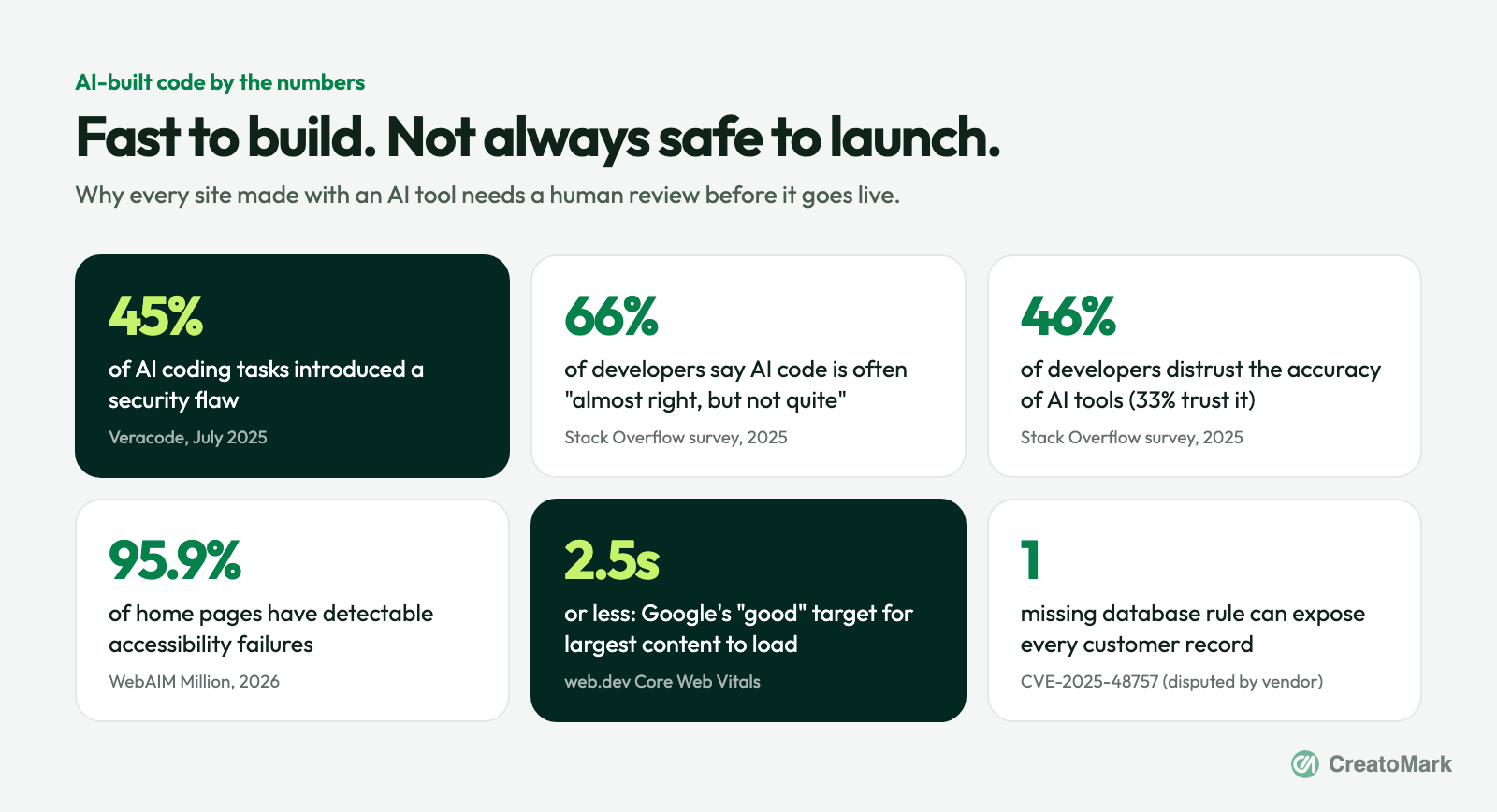
There’s also a real-world example worth knowing. A vulnerability in one popular AI app builder, recorded as CVE-2025-48757, described how a missing database security rule could let anyone read or write the database tables of sites built on it. The vendor disputes the record, saying each customer is responsible for protecting their own app’s data. Either way, the lesson for agencies is the same: someone has to check the settings, and right now that someone is usually nobody.
The one-hour audit
Before you quote anything, spend an hour looking properly. Here’s what to check, in order of how much damage each problem can do.
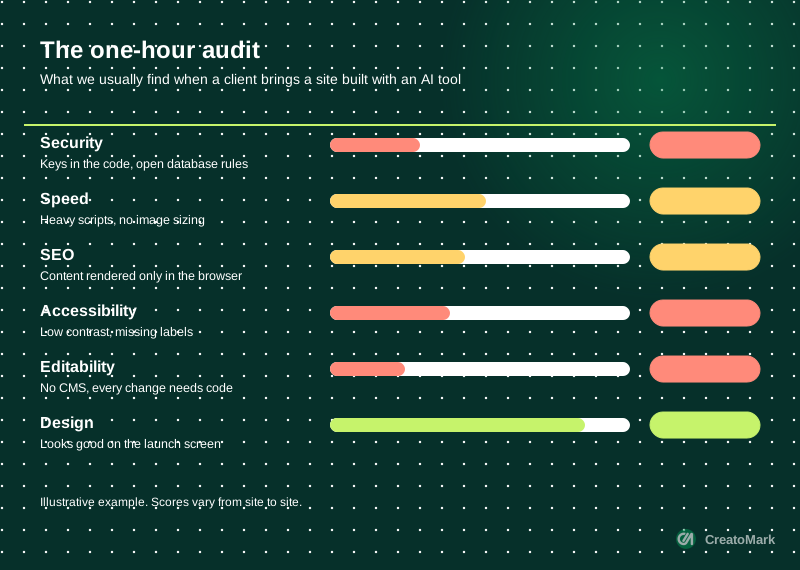
1. Security (check this first)
- Keys and passwords in the code. Open the page source and the browser’s network tab. Look for API keys, especially secret ones, sitting in plain sight.
- Database access rules. Many AI builders connect to a hosted database. If it uses Supabase, for example, Supabase’s own documentation says row level security must be enabled on any table in an exposed schema. Without it, data can be read through the public API.
- Forms. Where do form submissions go? Is there spam protection? Is personal data stored somewhere the client knows about?
2. Speed
Run the site through PageSpeed Insights on mobile. Google’s Core Web Vitals define a “good” experience as the main content loading within 2.5 seconds, interactions responding within 200 milliseconds and layout shift under 0.1. AI-built sites often ship heavy scripts and unsized images that miss all three.
3. SEO basics
- Does each page have its own title and description?
- Is the content in the HTML, or does it only appear after JavaScript runs? View the source and search for a sentence from the page.
- Is there a sitemap, and can search engines crawl the site at all?
4. Accessibility
Run a free checker like WAVE and look at the big ones: text contrast, image alt text, form labels and keyboard navigation. These issues aren’t just a compliance risk. They make the site harder for everyone to use.
5. Editability and ownership
This one gets missed most often, and it’s usually the deciding factor. Ask three questions:
- Can the client edit a headline without touching code?
- Who owns the code, the domain and the hosting account?
- Can it be exported and moved, or is it locked to one platform?
Tip: write the audit up as a simple one-page report with a traffic-light score for each area. It shows your expertise, and it turns a vague “can you finish it?” into a clear, paid scope of work.
Fix it or rebuild it?
Once you’ve done the audit, the decision usually makes itself. Here’s a quick way to frame it for the client.
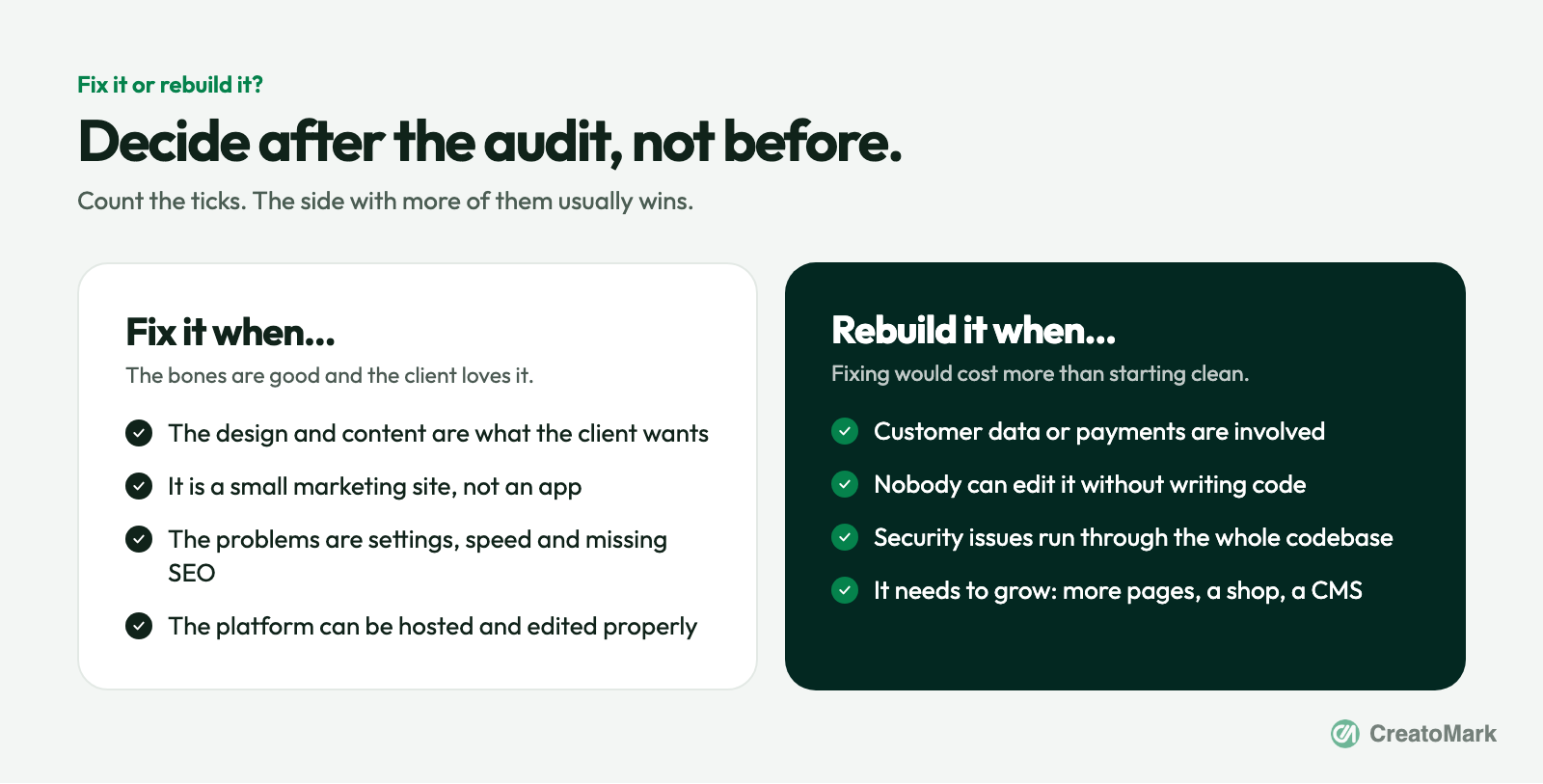
| Situation | Usually | Why |
|---|---|---|
| Small brochure site, issues are settings and speed | Fix it | The bones are fine. A few hours of focused work gets it launch-ready. |
| Client needs to edit content every week | Rebuild | Without a proper CMS, every change becomes a support ticket. |
| Customer data, logins or payments involved | Rebuild | Security problems in apps are expensive to patch one by one. |
| The client loves the design | Keep the design | Rebuild underneath, keep what they love on the surface. |
| It needs to grow (shop, blog, more pages) | Rebuild | Start on a platform built to grow, like WordPress or Webflow. |
That fourth row matters more than it looks. The AI-built version is often the clearest brief you’ll ever get. The client has already shown you exactly what they want. Use it as the design reference, and rebuild it properly underneath. Our vibe-coded to production service does exactly this, and Figma to WordPress works the same way when the design comes from a file instead.
How to talk to the client about it
This is where agencies lose the deal. Lead with “this is all wrong” and the client hears “you wasted your weekend”. Instead, start with what they got right.
“You’ve done the hardest part: you know exactly what you want, and this shows it clearly. Before it goes live, we need to check a few things you can’t see from the front, like security, speed and whether Google can read it. We’ve reviewed it, and here’s what we recommend.”
Then show the one-page audit. Let the traffic lights do the talking. Most clients don’t want a lecture. They want to know it’s safe, it works and someone has their back.
How to price the work
Three simple options cover almost every case:
- Paid audit. A fixed fee for the one-hour review and the report. Many agencies credit it against whatever comes next, which makes it an easy yes.
- Fix package. A fixed price to resolve the issues found: security settings, speed, SEO basics and accessibility fixes, then launch.
- Rebuild with care. A proper build on a platform the client can edit, followed by a monthly care plan so updates, backups and security checks never fall through the cracks.
Whichever they choose, add ongoing care. AI-built or not, every site needs looking after, and it’s the easiest step on the ladder we described in From One-Off Projects to Monthly Revenue.
Don’t have time to audit and rebuild these yourself?
That’s normal. These projects arrive at random, need a mix of skills, and are hard to plan around. A white-label partner can take them on behind your brand: the audit, the fixes or the full rebuild on WordPress or Webflow, plus ongoing hosting and care. See what we fix in AI-built sites.
Got an AI-built site on your desk right now? Book a growth call and we’ll talk you through how we’d approach it, or compare plans on our pricing table.
The bottom line
AI builders aren’t your competition. They’re a new way for clients to arrive with a clear idea of what they want. The agencies that win are the ones that respect that effort, check the work properly, and turn a weekend experiment into a site that’s safe, fast and easy to run.
So next time a client sends that proud little link, don’t sigh. Smile, run the audit, and send them a plan.
Sources
- Veracode: AI-generated code poses major security risks in nearly half of all development tasks (July 2025)
- Stack Overflow: 2025 Developer Survey, AI section
- WebAIM: The WebAIM Million, 2026 report
- web.dev: Web Vitals and their thresholds
- NIST National Vulnerability Database: CVE-2025-48757
- Supabase: Row Level Security documentation